Download free fonts, graphics, icons, photos, psd templates and vectors files for designers and all creative people
Showing posts with label Generator. Show all posts
Sunday, December 4, 2011
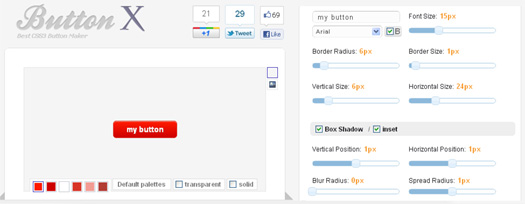
Web-based CSS Button Maker
Button X is an web-based CSS button maker tool which helps you create awesome CSS3 buttons without Javascript, Flash or even Images.
Customize and experiment CSS3 features with an easy to use UI, create your own button and get your CSS code.
Thursday, August 4, 2011
CSSWarp : A CSS3 Text to Path Generator
CSS3Warp is a proof of concept: create Illustrator like "warped" text (text following an irregular path) with pure CSS and HTML.
How does it work?
CSS3 brings new text-transform options: rotation, skew, matrix, transform-origin... By applying the right transformations to every single letter it is possible to create the illusion of text following a path.
Type your text into the webform, click "Warp it!", then alter the path as you like. You can attach your text to a circle or a bezier. Add or delete points, or change position, angle and radius of the circle. When your done, click "Generate code". Copy the CSS and HTML into your document.
http://csswarp.eleqtriq.com/
Monday, August 1, 2011
Minimus: The OS X JavaScript and CSS Minifier
Users like fast websites. That’s one of the universal rules of web development. To attain faster speeds, it’s common to use a process known as “minification” to compress the file size of JavaScript and CSS. Yahoo developed one of the most commonly-used tools for this, a command line program called the YUI Compressor. This open source project has become integrated into many other tools, including numerous websites that will minify any JavaScript or CSS you paste into a form field.
Minimus is a GUI frontend for Yahoo’s YUI Compressor. Instead of using inconvenient and slow websites to compress your JavaScript and CSS, you can do it right on your Mac.
Add files to the queue by dropping them on the Dock icon (or by using the File menu) and press the Minify button to start the process. In no time at all, copies with a .min.js or .min.css extension will appear alongside the originals.
Minimus is a free download, but donations are appreciated by the author if you find the app useful.
Requires Mac OS X 10.6 Snow Leopard.
Speed Your Page With Easy CSS Sprite Generator
CSS sprites are a commonly used technique to decrease page load times.
This CSS technique can make your website load faster. Instead of having a dozen images that are included on every page of the site - your logo, RSS button, icons for social media links, etc. - you combine them all into one big image. You can then use CSS to display just the portion you need in any given spot.
Sprite Cow helps you get the background-position, width and height of sprites within a spritesheet as a nice bit of copyable css.
Automated spritesheet generators are pretty cool, but if you prefer the control over optimisation and compression you get by making them manually, then Sprite Cow provides you a user-friendly solution.
The web interface couldn't be easier. Upload your image and have a click around. It becomes pretty obvious. So you don't waste your time copying all the positions & sizes from graphics
http://www.spritecow.com/
Saturday, July 30, 2011
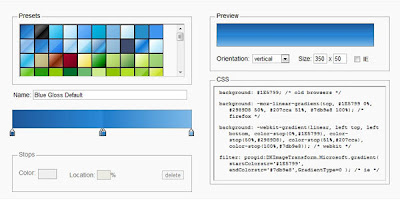
Ultimate CSS Gradient Generator
Version 3 of Ultimate Generator
What's new
» Opacity support
· Create transparent css gradients, or add fade-in, fade-out, semi-transparency and similar effects
· Add any number of opacity stops to your gradient
· Supports opacity stops at any position - completely independent of color stops
· Automatically switch to rgba/hsla color output mode when transparency is used
· Outputs older Internet Explorer opacity format (yes, this will even work with IE6!)
· Opacity support when importing from CSS
· Supports importing gradients with transparency from an image
» Double click on CSS text output to select all of it for easy copying
» More robust new algorithm for converting gradient images to CSS, including alpha support
» New 'Adjustments' panel - tweak your gradient or create new flavors
· Adjust hue, saturation and lightness
· Reverse current gradient
» Added hsl and hsla color format support in CSS output
» Added a unique permalink to each gradient for linking to, saving or sharing specific gradients.
» Added the ability to toggle CSS comments on/off.
About
The Ultimate CSS Gradient Editor was created by Alex Sirota (iosart). If you like this tool, check out ColorZilla for more advanced tools such as eyedroppers, color pickers, palette editors and website analyzers.
As you might know, HTML5 introduced many exciting features for Web developers. One of the features is the ability to specify gradients using pure CSS3, without having to create any images and use them as repeating backgrounds for gradient effects.
Important: You'll need a recent version of Firefox, Chrome, Safari or Opera to use this Gradient Generator. The resulting CSS gradients are cross-browser - they will work in these browsers and will also fall back to a simpler gradient in Internet Explorer.
Links to CSS gradients documentation: in Firefox, Safari and Chrome (Webkit) [older], Internet Explorer and Opera [2].
Subscribe to:
Posts (Atom)