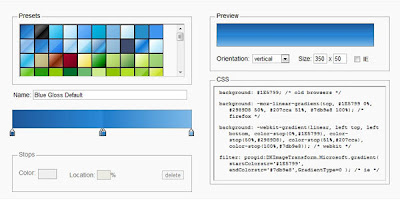
Version 3 of Ultimate Generator
What's new
» Opacity support
· Create transparent css gradients, or add fade-in, fade-out, semi-transparency and similar effects
· Add any number of opacity stops to your gradient
· Supports opacity stops at any position - completely independent of color stops
· Automatically switch to rgba/hsla color output mode when transparency is used
· Outputs older Internet Explorer opacity format (yes, this will even work with IE6!)
· Opacity support when importing from CSS
· Supports importing gradients with transparency from an image
» Double click on CSS text output to select all of it for easy copying
» More robust new algorithm for converting gradient images to CSS, including alpha support
» New 'Adjustments' panel - tweak your gradient or create new flavors
· Adjust hue, saturation and lightness
· Reverse current gradient
» Added hsl and hsla color format support in CSS output
» Added a unique permalink to each gradient for linking to, saving or sharing specific gradients.
» Added the ability to toggle CSS comments on/off.
About
The Ultimate CSS Gradient Editor was created by
Alex Sirota (iosart). If you like this tool,
check out ColorZilla for more advanced tools such as eyedroppers, color pickers, palette editors and website analyzers.
As you might know,
HTML5 introduced many exciting features for Web developers. One of the features is the ability to specify gradients using pure CSS3, without having to create any images and use them as repeating backgrounds for gradient effects.
Important: You'll need a recent version of Firefox, Chrome, Safari or Opera to use this Gradient Generator. The resulting CSS gradients are cross-browser - they will work in these browsers and will also fall back to a simpler gradient in Internet Explorer.